> For the complete documentation index, see [llms.txt](https://docs.finandy.com/llms.txt). Markdown versions of documentation pages are available by appending `.md` to page URLs; this page is available as [Markdown](https://docs.finandy.com/es/trading/create-order-grid.md).
# Crear orden / grid
La creación de una orden tiene lugar en la página "Trading":
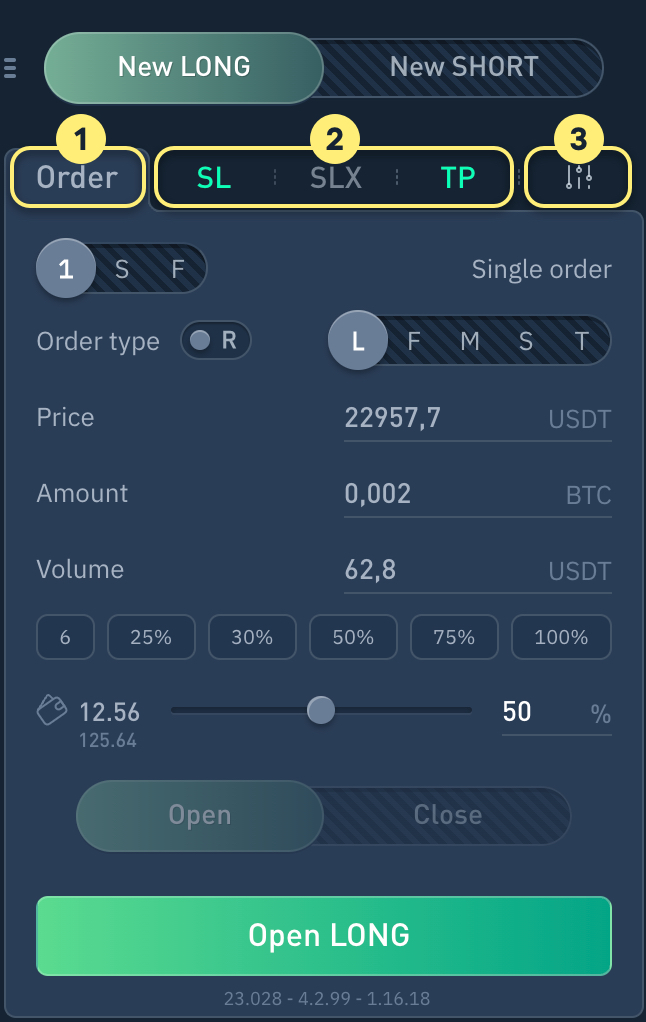
La interfaz del formulario de creación de órdenes (apertura de posición) consta de las siguientes pestañas:
1. Formulario de creación de una orden o grid de órdenes
2. Módulos de control Stop Loss, Trailing y Take Profit
3. Ajustes
1\. Formulario de creación de una orden o grid de órdenes:
{% content-ref url="/pages/Qlai83Ds6qU9JPsYYY7h" %}
[Orden única](/es/trading/create-order-grid/single-order.md)
{% endcontent-ref %}
{% content-ref url="/pages/6lsOw6mc5XbhUKZdaffo" %}
[Grid de órdenes](/es/trading/create-order-grid/order-grid.md)
{% endcontent-ref %}
{% content-ref url="/pages/3T3T6OGNps05IWVTxAe9" %}
[Grid (niveles) de Fibonacci](/es/trading/create-order-grid/fibonacci-grid-levels.md)
{% endcontent-ref %}
{% content-ref url="/pages/t3VboX5OllXfLQp2pYCy" %}
[Tipos de órdenes](/es/trading/create-order-grid/order-types.md)
{% endcontent-ref %}
{% content-ref url="/pages/nRNdm6CZ7dxwnH8i5hB0" %}
[Volúmenes personalizables](/es/trading/create-order-grid/custom-volume.md)
{% endcontent-ref %}
2\. Módulos de control Stop Loss, Trailing y Take Profit:
{% content-ref url="/pages/-MEYZoKvXA8X7yVHtg63" %}
[Stop Loss (SL)](/es/trading/stop-loss.md)
{% endcontent-ref %}
{% content-ref url="/pages/-MEYZoKwn8aFA6J\_8R71" %}
[Trailing Stop (SLX)](/es/trading/trailing-stop.md)
{% endcontent-ref %}
{% content-ref url="/pages/-MEYZoKxeOWzbt4s63Kw" %}
[Take Profit (TP)](/es/trading/take-profit.md)
{% endcontent-ref %}
3\. Ajustes:
{% content-ref url="/pages/nRNdm6CZ7dxwnH8i5hB0" %}
[Volúmenes personalizables](/es/trading/create-order-grid/custom-volume.md)
{% endcontent-ref %}
{% content-ref url="/pages/W2LEI9l48zSZQQyclOc4" %}
[Informes de trading](/es/trading/reports.md)
{% endcontent-ref %}