> For the complete documentation index, see [llms.txt](https://docs.finandy.com/llms.txt). Markdown versions of documentation pages are available by appending `.md` to page URLs; this page is available as [Markdown](https://docs.finandy.com/es/algo-trading/signals-tradingview/connection-and-configuration/closing-position.md).
# Posición de cierre
Si la señal de TradingView aún no está conectada al terminal de Finandy, siga estas instrucciones:
{% content-ref url="/pages/ghfEJxLkWZvHJLSRfVaA" %}
[Conexión del indicador o estrategia TradingView a Binance / OKX](/es/algo-trading/signals-tradingview/connection-and-configuration/indicator-strategy-connection.md)
{% endcontent-ref %}
## Configuración de Finandy
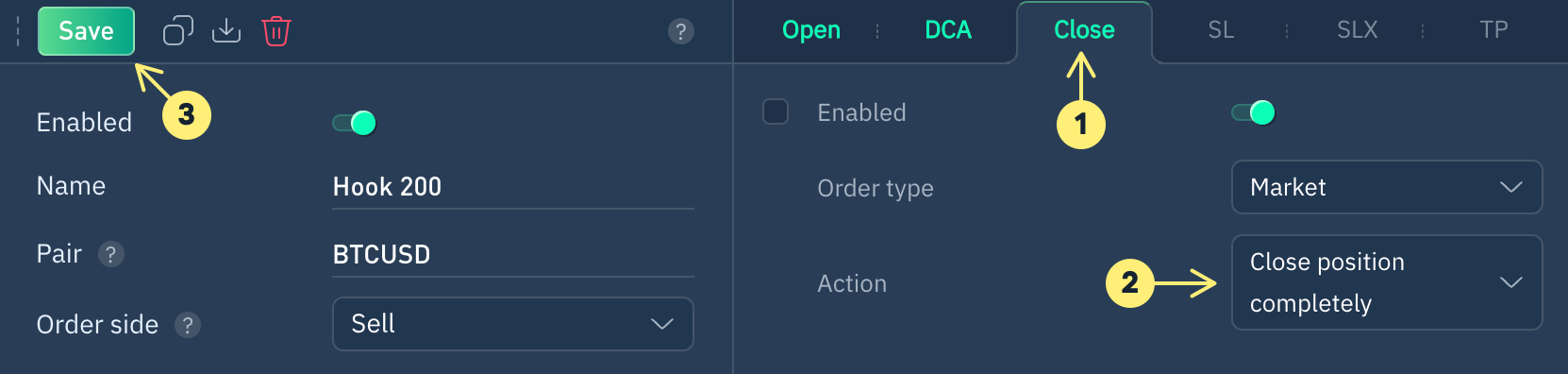
1. Abra la pestaña "**Cerrar"**.
2. Seleccione la acción "**Cerrar posición completamente".**
3. Guarde los cambios.
Instrucciones más detalladas para configurar una orden de cierre:
{% content-ref url="/pages/nSr80M4vcmKLpTmzO85l" %}
[Cierre / Reversa](/es/algo-trading/signals-tradingview/interface/close.md)
{% endcontent-ref %}
**¿Todavía tienes preguntas? Permítenos ayudarte en nuestro chat de Telegram.**
{% embed url="" %}